
Code Analysis
Code analysis automatically reviews your source for problems — bugs, code smells, and style violations — without manual inspection. Running it as a pipeline stage gives you fast, consistent feedback that improves reliability and keeps technical debt in check as your project grows.
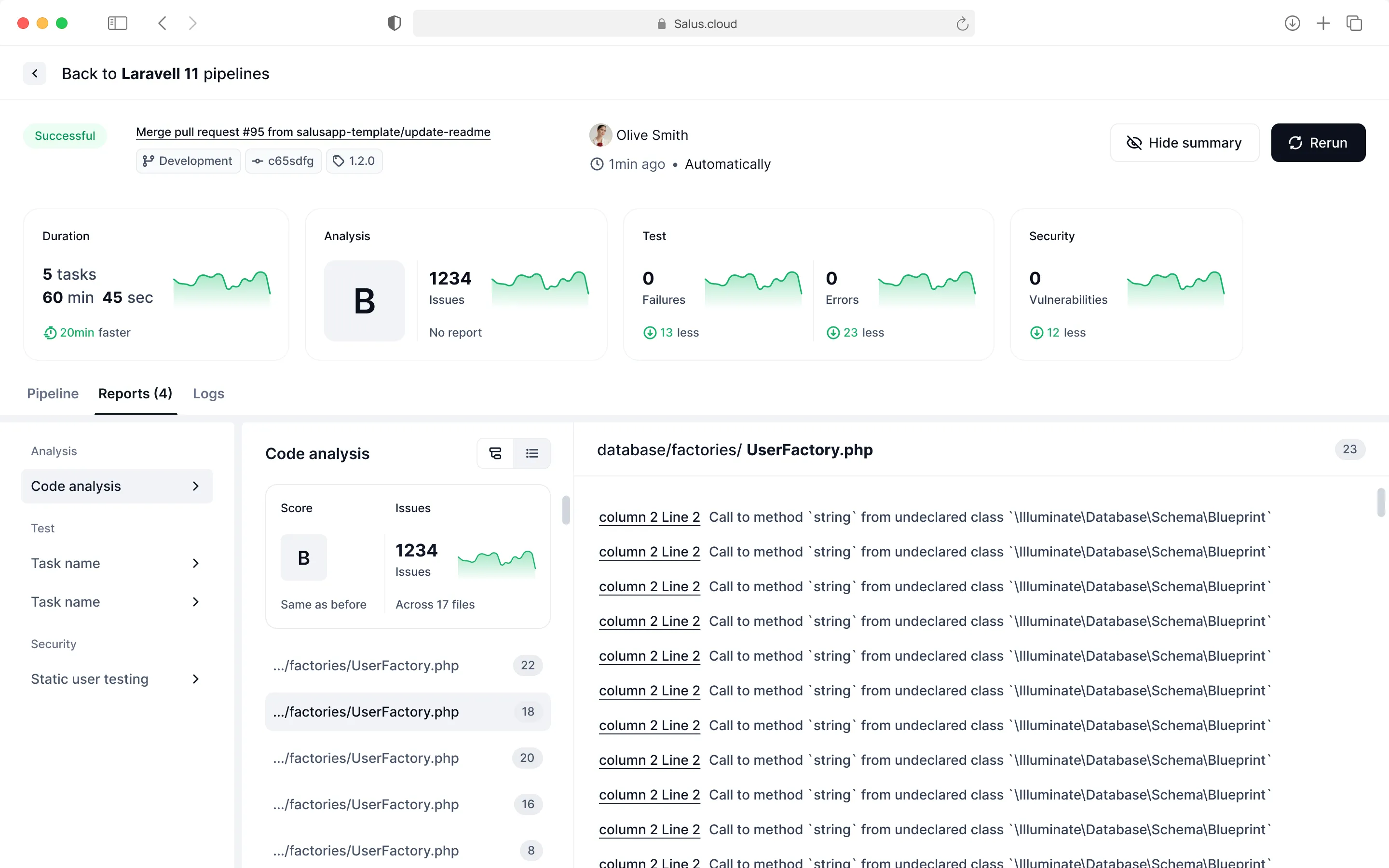
For every pipeline run, the code analysis stage runs automatically and surfaces the issues it finds in your code. You can dig into them in the pipeline details page, under the report tab for code analysis.
Code analysis report
The report breaks down the problems detected in your code. It tells you how many files were covered and the total number of issues found, and for each issue it shows:
- Check name — the specific rule that was violated.
- Description — what the issue is.
- Severity — how serious it is.
- Category — the kind of issue (for example a bug or a code smell).
- Location — the file and line number(s) where it was found.
- Remediation effort — an estimate of the work needed to fix it.
Code analysis logs
View the analysis-stage logs by opening the Logs tab and selecting the analysis stage from the drop-down on the left-hand panel.