Organizations & Teams
Your organization is your top-level account on Salus. It holds your members and their roles, your connected Git providers, your billing and credits, your managed databases, and the regions your environments can run in. Everything else — workspaces, projects, and environments — lives inside it.
Create an organization
Create an organization and give it a name (letters and numbers only). If more than one region is available to you, you’ll also pick the region your organization starts in. Once the organization exists, you can invite your team, connect a Git provider, and start creating projects.
Members and roles
Every person in your organization is a member with a role that determines what they can do. There are four roles you can assign, from full control to read-only:
- Owner — full control, including members and billing.
- Maintainer — manage workspaces, projects, and configuration.
- Developer — work day to day on projects and deployments.
- Viewer — read-only access.
You may also see a fifth role, Guest — and it works differently from the other four:
- You never assign it, and you can’t. Salus creates it automatically when someone accepts an invitation to a specific workspace or project without already being a member of your organization; attempts to grant Guest manually are rejected.
- Organization-wide, a Guest can do almost nothing. They can see the list of workspaces, the organization’s connected Git providers, and application logs — just enough for the app to work. No projects, no settings, no billing.
- Their real access is the scoped role their invitation carried. A Guest invited as a Developer on one project is a Developer there and a Guest everywhere else.
- To widen their access, assign them one of the four organization roles from your members list — that replaces the Guest placeholder.
Roles are scoped — a member can have one level of access across the organization and a different level in a specific workspace or project. For the full picture of what roles govern, see Access Control.
Invite your team
Invite someone by email from your organization settings and assign the role they should have. An invitation moves through a clear set of states — pending until they accept, then accepted, or expired if it lapses (you can also see rejected invites). If the person isn’t a Salus user yet, they’ll be prompted to create an account when they accept.
Connect your Git providers
Your organization is where you connect the Git providers your projects import from — GitHub and GitLab. See Git Management.
Regions
Your organization controls which regions — cloud locations across providers — its environments can run in. The Regions page in your organization settings lists every region available to you, labelled by provider and location, along with how many deployments are currently active in each.
If you have permission to manage organization settings, you can:
- Enable or disable regions, so builders pick from a curated set rather than everything on offer.
- Set the default region — the one pre-selected whenever someone creates a new environment.
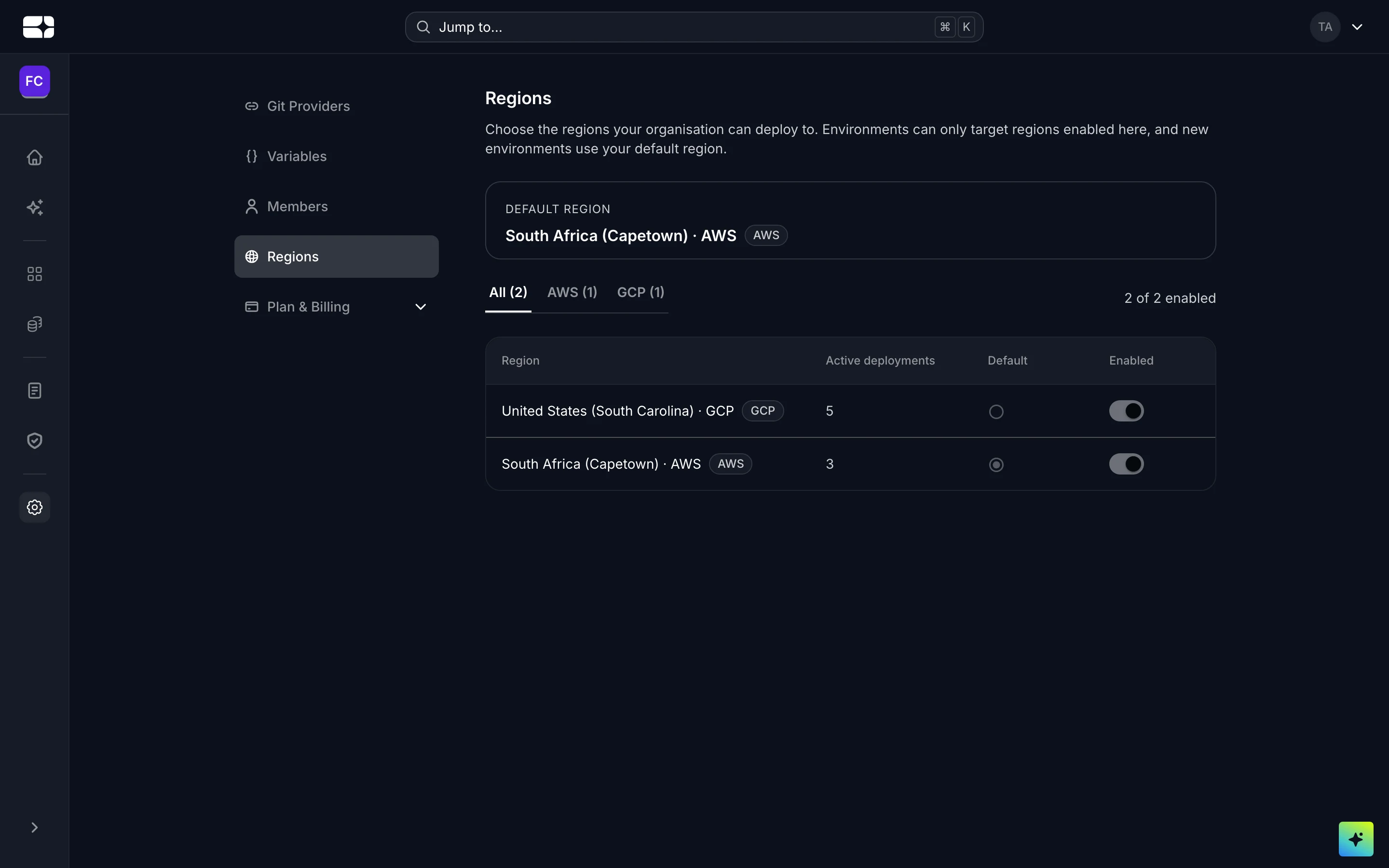
The Regions page in organization settings
Each environment chooses its region when it’s created, from the regions enabled here — so one organization can run across several regions and clouds at once. See Environment Configurations.
Billing and credits
Your plan, credit balance, payments, and usage are all managed at the organization level. See the Billing Dashboard and Salus Credits.