Deployment History & Rollback
Each environment keeps a deployment history: every revision that was released into it, newest first.
What the history shows
Each revision carries:
- Status — Pending, In progress, Successful, Failed, or Cancelled, with the current release marked as the latest deployment.
- What was deployed — the commit message, branch or tag, and commit hash, plus who triggered it.
- Deployment type — whether the revision came from a pipeline run or a rollback.
- Resources — the compute the revision ran with.
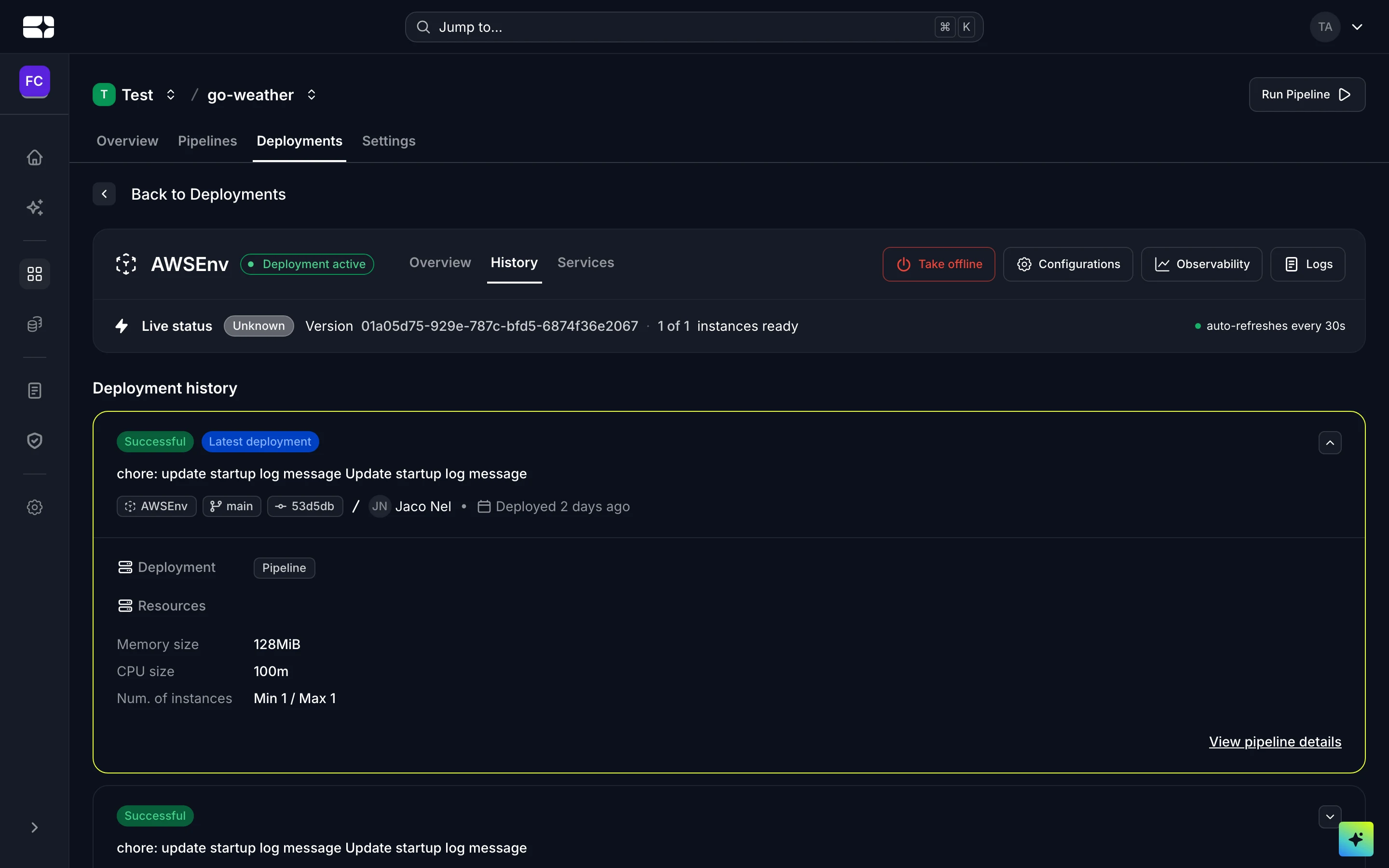
Deployment history for an environment
Roll back a release
If a release causes trouble, you can roll back to an earlier revision to restore a previous known-good deployment.
A Rollback button appears on revisions that are eligible — not every revision qualifies. Rolling back:
- Redeploys the selected revision and replaces the current release.
- Takes the currently running deployment out of rotation.
You’ll be asked to confirm against the revision’s commit before anything happens. The rollback itself appears in the history as a new revision of type Rollback, so the record stays complete.
Troubleshooting
- A revision has no Rollback button. It isn’t eligible for rollback — pick another known-good revision that is.
- You rolled back but the bad behavior persists. Check whether the cause was configuration or data rather than the build — variables and databases aren’t rewound by a rollback.